VERI*FACTU arrives in 2027. Affected businesses will need to adapt their invoicing software. What it means for you →
How to download a filed Form 036 or 037
Where to find the copy filed with the Spanish Tax Agency, which PDF is valid and what to do if you have an old Form 037.
Zolven · 2 min read · 27 July 2026
How to download it
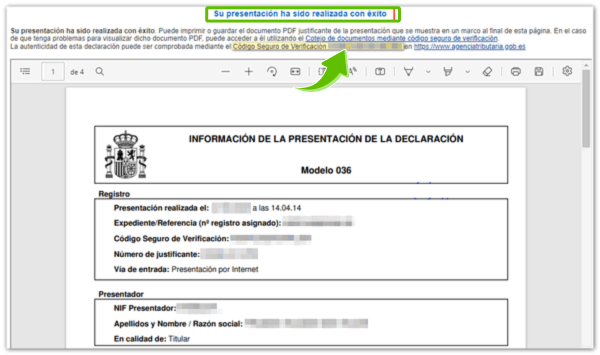
To retrieve a Form 036, open the filed Form 036 declarations search. If you need a Form 037 filed before it was withdrawn, use the filed Form 037 declarations search. In both cases, sign in with a digital certificate, electronic ID card or Cl@ve.
- Find the declaration.
- Download the filing receipt together with the complete copy.
- Check that the secure verification code (CSV) or registration number is shown.
- Keep the entire PDF; do not crop it or split its pages.

If it is not listed
Check My census details to see your current registration status. If an accountant or representative filed the form, ask them for the complete copy. The census search shows current information but does not replace the filing receipt for a specific declaration.
Keep reading
AEAT census status certificate: how to get it
Which tax-register details it certifies, how to request it online and where to download the issued PDF with its CSV.
Zolven · 3 min read · 10 August 2026
How to get an FNMT digital certificate
How to apply for an individual certificate, prove your identity, download it and store a backup safely.
Zolven · 3 min read · 28 July 2026
Deeds and the Companies Registry: which document to download
What the deed proves, when an information note is enough and when you need a registry certificate.
Zolven · 2 min read · 27 July 2026

The deadline is already on the calendar. Your new gestoría can be too.
Limited places in the pilot programme for self-employed people. Tell us about your business and we’ll let you know whether Zolven can already run its back office.
We reply within 24 hours · hola@zolven.ai